

Measurements
Measurements
In Vetocare, you can keep track of each animal's weight and withers height. By entering measurements in Vetocare, you can build a graph that clearly shows whether an animal is growing, losing weight, or gaining weight, for example.
To enter an animal's measurements, go to the animal's record. Click the "Weight" or "Withers height" button. You can adjust the units shown on this screen in the settings. For more information, see: Language, units, and time settings.
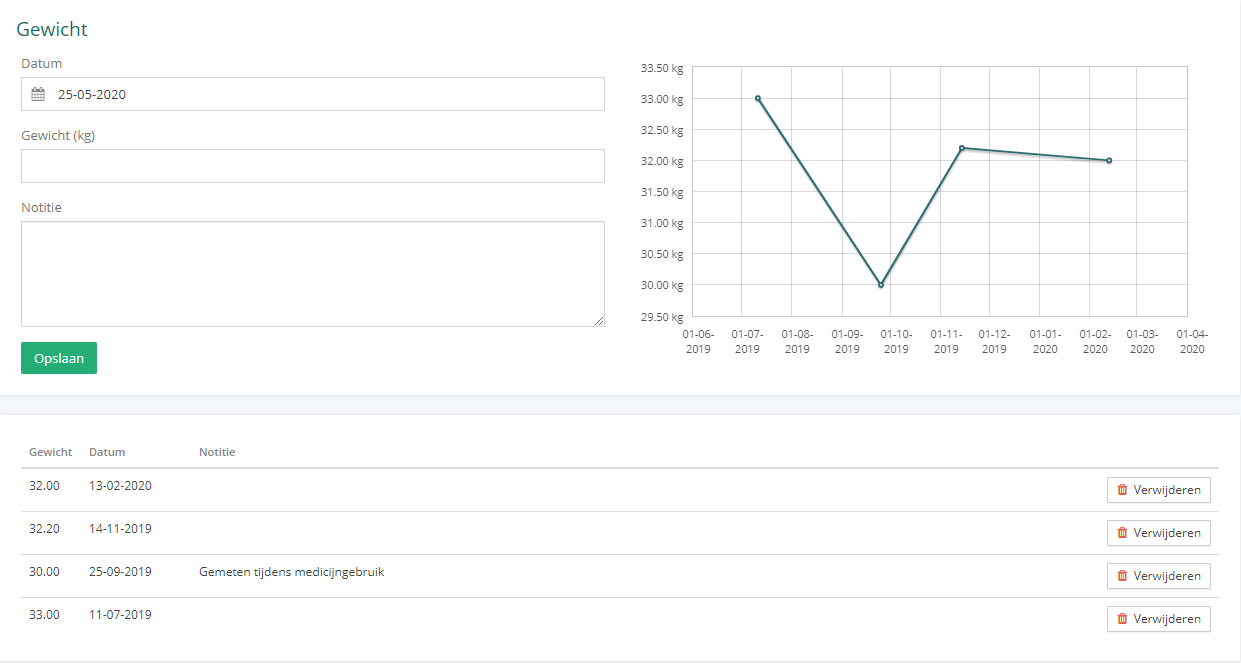
Create a new measurement
You can create a new measurement by entering the measurement date, value, and optionally a note. The measurement date is set to today by default, but you can change it to a date in the past. To create the measurement, click "Save".
Measurements graph
All measurements are shown in a graph. This graph plots the date and measurement value linearly, allowing you to quickly see whether an animal is growing, losing weight, or gaining weight. Hover over a point on the line to see the date and exact measurement value.
Measurements table
The measurements are also shown in a table below the graph. The note is included here as well. In addition, the table contains a delete button for each measurement, which you can use to delete the corresponding measurement.