

Exporting the calendar
Exporting the calendar
Within Vetocare, you can export your calendar to an Excel or CSV file. To do this, go to the "Calendar". Then click the "Export" button at the top of the screen. A screen will open where you can set a number of filters.
Calendar
You can select one or more calendars to export using the checkboxes.
Period
You can set the period for which appointments are exported in three ways. You can enter a start and end date, select a month, or select a year.
File format
You can choose to export the calendar as an Excel or CSV file.
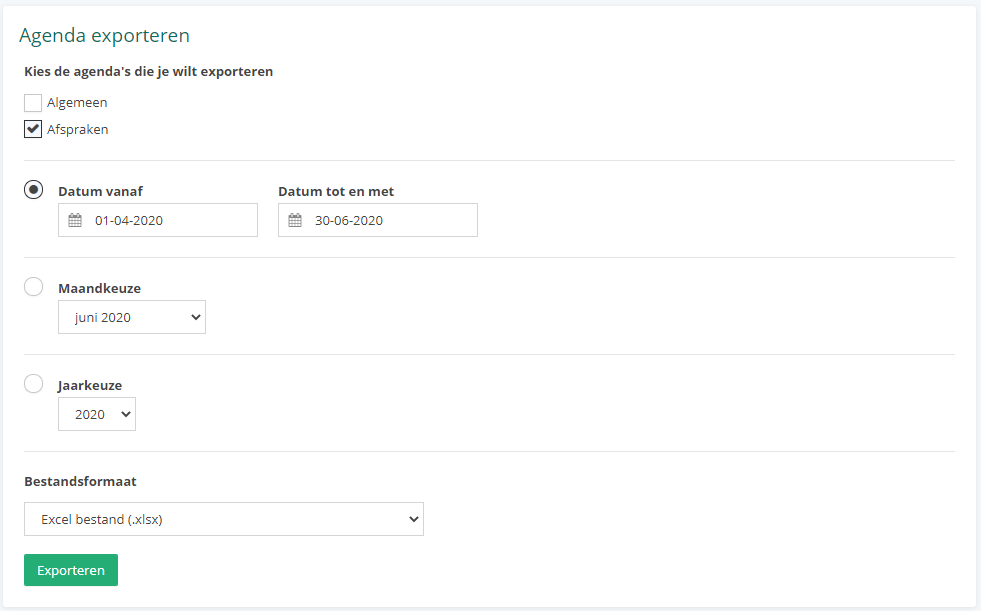
Once everything has been set as desired, you only need to click the "Export" button. The file will be downloaded shortly afterward.
Was this helpful?
Was this helpful?