

Standard messages
Standard messages
Vetocare allows you to create standard messages, so you can quickly and easily use preset emails in the future. Standard messages are useful for appointment reminders, sending invoices, and many other purposes. This is because the structure of these email messages is often the same, with only a few fields differing.
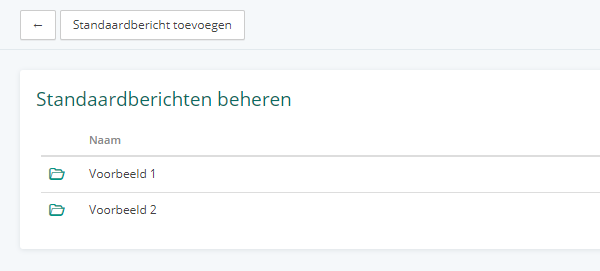
To create a standard message, first navigate to 'Settings', then go to 'Standard messages' under the 'Emails' heading.
When you create your Vetocare account, two example standard messages are added automatically. You can customize or delete them as desired.
Add/edit a standard message
To add a standard message, use the 'Add standard message' button in the top-left corner. To edit a standard message, click on it.
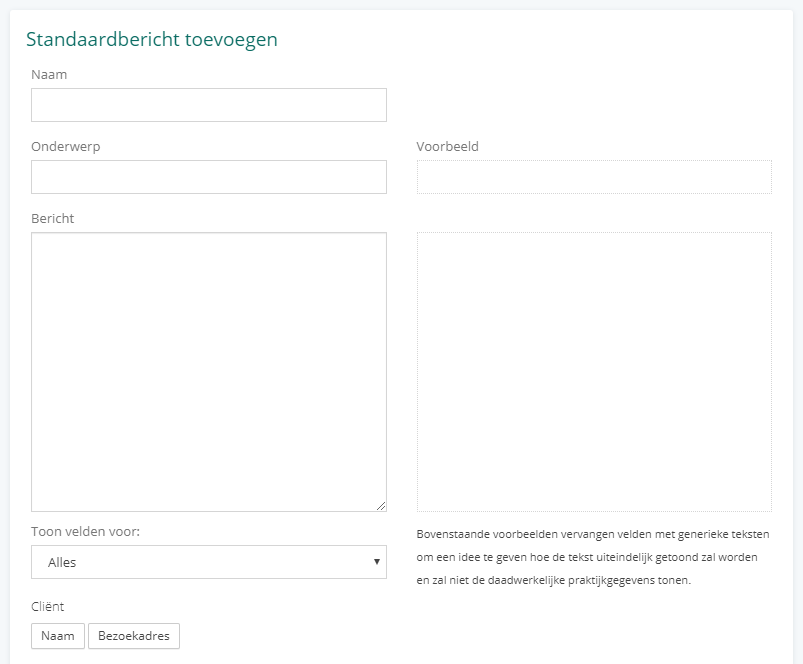
Here, you can enter a name (so you can recognize the message), an email subject, and the associated message.
On the left, you can see the standard message as you create it, with so-called tags such as {{CLIENT}}. On the right, you can see a preview of what the message might ultimately look like.
Below the message, you will find a large list of possible tags that you can enter in the message. These are then automatically replaced in the final email message. You can also choose which functionality you want to use the standard message for, so you will only see tags relevant to that functionality. For example, if you choose Reminders, you will only be able to select tags for the client and their animal, the appointment, and your practice information.