

Manage product groups
Manage product groups
Vetocare makes it possible to use product groups when keeping track of inventory. Product groups make it very easy to categorize all the products in your Vetocare system, giving you a clear overview.
To add a product group to your Vetocare, go to "Manage product groups" under "Products" in your Vetocare settings.
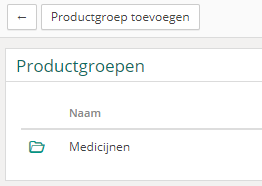
As you can see, you now have an overview of all existing product groups in your Vetocare. If you have not added any product groups yet, the overview will be empty because no product groups have been created.
To create a product group, click the "Add product group" button.
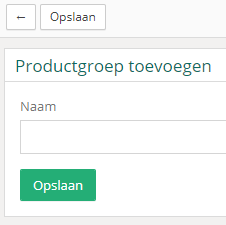
You only need to enter the name of the product group and then click "Save" to add the product group to your Vetocare.
Once you assign a product to a product group in Vetocare, you can search by the product group name in the product overview, allowing you to see all products in the searched product group.
Delete a product group
If a particular group of products is no longer sold or needed, you can delete the product group.
To delete an existing product group, simply navigate to the specific product group you want to delete. Then click the "Delete" button, after which a confirmation prompt will be displayed. Once the deletion is confirmed, the product group will be removed from your Vetocare.