Create a drawing
Create a drawing
In Vetocare, you can add comments to images. These commented images are called drawings in Vetocare. Drawings can be created for an animal in the animal's documents and can also be created for a report.
Drawings for an animal
To add a drawing for an animal, navigate to the animal's documents. There, click the "New drawing" button.
Drawing for a report
To insert a drawing into a report, navigate to the desired report or create a new report, then click the "New drawing" button at the top.
After clicking the "New drawing" button, you will be taken in both cases to a page showing an overview of all images for the practice and the animal. Here, you can select the desired image to add comments to it. If the desired image is not listed, click the "Show all" buttons to view all practice or animal images. You can also upload new practice and animal images if desired using the "+ Upload" buttons.
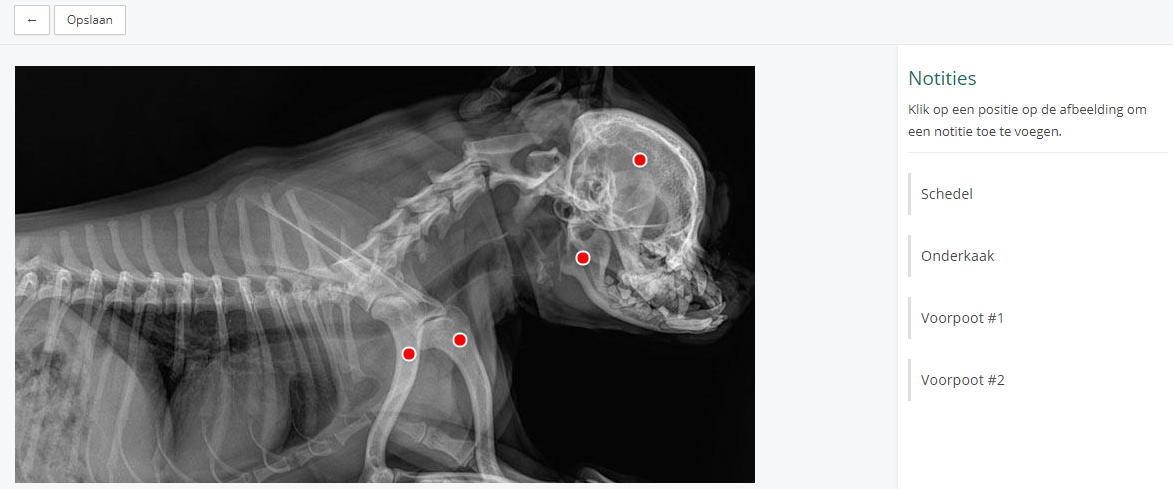
After selecting the correct image, click "Use image". You will then be taken to the editor page. Click the image to place a dot. When a dot is placed (temporarily for now), a text field appears in the sidebar on the right. You can type a note here, and then click "Add" to add the dot. The note you just created will then appear in the sidebar. Click the note in the sidebar to edit or delete it. To save the drawing, click the "Save" button; it will then be added to the animal or report. If a drawing has been added, changed, or deleted, remember to save the report as well.