Invoice number format
Invoice number format
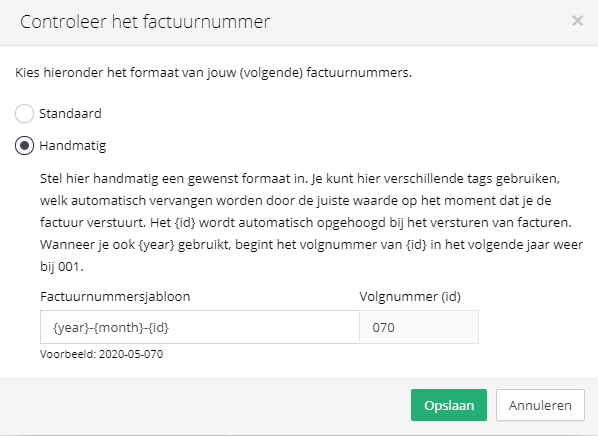
In Vetocare, you can customize the invoice number format to suit your needs. By default, each invoice is assigned a sequential number starting from the first number, and the numbering starts over each year. However, Vetocare also allows you to omit the year from the format, so the sequential number continues after the new year. You can configure the invoice number format by opening an invoice and clicking the invoice number. This opens a screen where you can choose between standard and manual.
Standard
With the standard format, the format is "Year-number". If this is the practice's first invoice, you can choose the starting number yourself. This allows you to continue the invoice numbering from the invoices issued earlier that year, before Vetocare was used. The invoice number for subsequent invoices will automatically be the previous invoice number plus one.
Manual
With the manual option, you determine the invoice number format yourself. When you click the text field, you will see several options that will be inserted automatically into the number, but you can also add static text. For example, you can include the quarter number, month number, and year.
If you start using a new invoice number format, you can set a new sequential number. This allows you to continue the numbering from another invoicing system.