

Adding animal(s) via intake
Adding animal(s) via intake
Through an Intake, you can send an enrollment form for an animal to a client, which automatically adds the animal to your environment with the information the client fills in for you.
When creating this intake, you can choose whether the client adds their own animals, or you can specify in advance which animals you want to conduct this intake for. The client can then add up to 10 different animals. If specified when creating the intake, a report can also be added automatically for each animal. For example, you can attach a medical history form containing fields that are not available in the standard form.
Animal information - All information related to the animal. This is the same screen you would see when adding an animal in the usual way.
Report per animal - If specified, a report is added to the intake for each animal. These contain exactly the same fields as those you specified in the template.
At the end of the intake, the client always has the option to add additional information, should they have any extra information available.
Animals belonging to a client who is still completing the intake are, despite the

label, fully available as a regular animal. This means that appointments, reports, and invoices can simply be created under the name of this animal.
Create intake
To create an intake, go to 'Clients' in the menu and open the relevant client. In this overview, you will find an 'Animals' section. This section contains two buttons in the top-left corner: 'Add animal' and 'Via intake'. Use the second button for the intake. If this button is not available, it means that the client is still completing another intake, which must first be completed or ended.
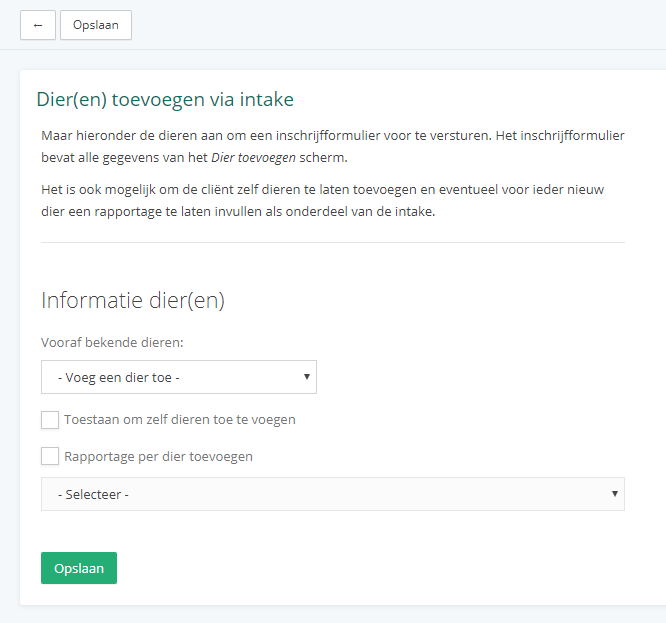
Here you can select everything you need for your intake. You can specify the animals in advance, choose to have the client fill this in themselves, or use a combination of both.
Once everything has been filled in and you have clicked 'Save', a screen will appear where you can choose how you want to send this intake.
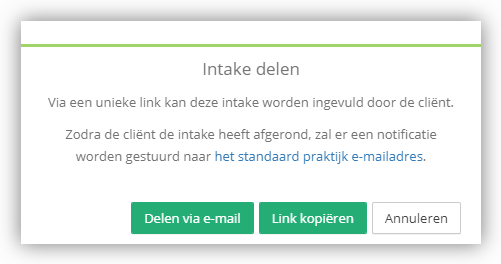
When sharing it, you receive two important things: a unique link to this intake and a corresponding personal code. The client needs both of these to fill in the intake forms.